
Become a subscriber
Enjoy all three 2027 productions with a season subscription.
Book your subscription tickets
Download guide (PDF)Once you have your subscription, you can book seats for each production when you know which performance suits you. Seats are subject to availability.
Screenshots show an example booking.
-
Find the production
Go to adelaiderep.com/season/2027, choose a production and select Book tickets.
-
Sign in
On TicketSearch, select Sign in for member pricing. Enter the email address and password used to buy your subscription, then select Log In.
No password? Select Forgot Password or No Password Set? and follow the email instructions.
-
Open your subscription tickets
Select the person icon at the top right. Select Orders, then Your Benefits.
- Find the offer for your production: 2027 Single Membership for a $95 subscription, or 2027 Double Membership for a $190 subscription. Select Redeem Now beside it.
- Select Buy Now for the production.
To use the extra free ticket with a $190 subscription, choose 2027 Double Membership - Extra Ticket instead, then choose a production.
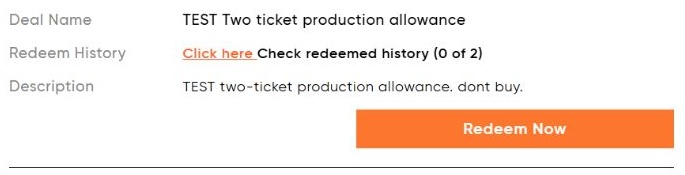 Enlarge screenshot
-
Choose a performance and seats
Under Choose a Date, select the date and time you want.
- Click a green circle on the seating map for each seat you want. A selected seat shows a tick. Click it again to remove it.
- Select Click Here to Select Ticket Types.
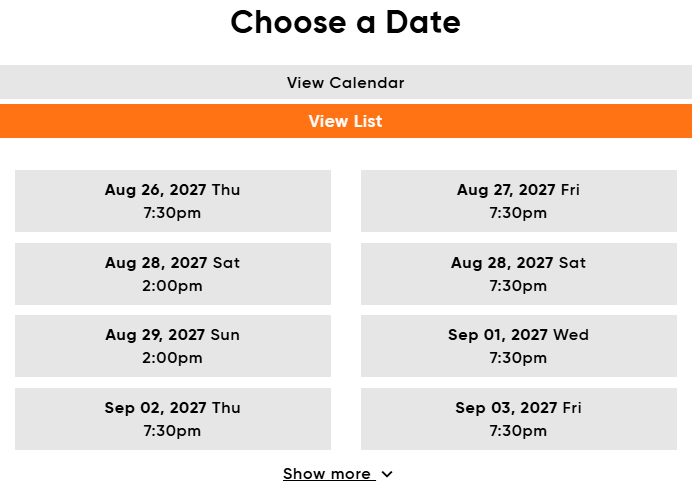 Enlarge screenshot
-
Choose the ticket types
Use the dropdown beside each seat to choose Adult, Concession Card Holder or Student, according to the person attending.
Each included ticket shows $0.00 after its original price. If it does not, select Go Back and restart from Your Benefits using Redeem Now. If the price is still not $0.00, contact us before paying. Subscriber Guest is for an extra paid ticket.
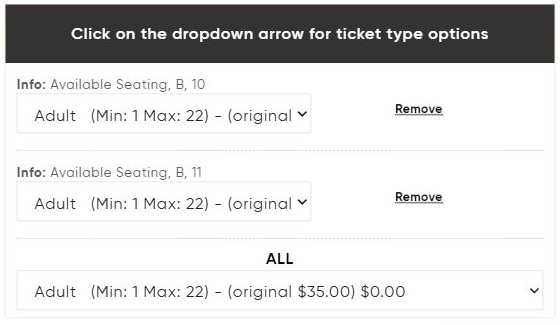 Enlarge screenshot
-
Add the tickets to your cart
Select Continue, then Add to cart. When the cart opens, select Go to Checkout.
-
Choose how to receive your tickets
Under Patron Details, check your name and email address, then select Next.
Under Select Ticket Delivery Method, select eTicket to receive your tickets as a PDF by email. Select Next.
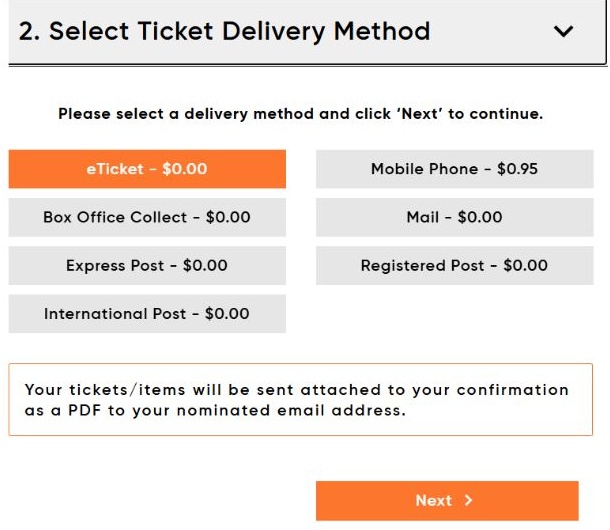 Enlarge screenshot
-
Complete your booking
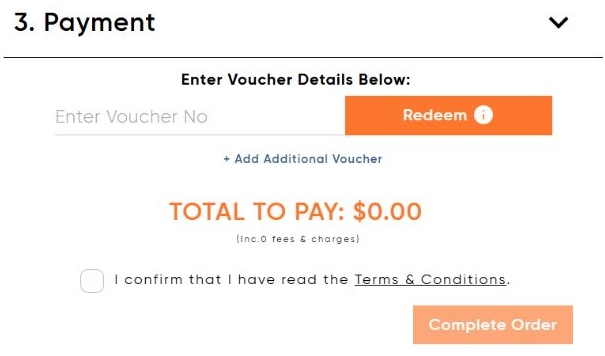
Under Payment, you do not need to enter a voucher number or card details for a $0.00 booking. Read the Terms & Conditions, tick the acknowledgement box, then select Complete Order.
Wait for the confirmation page. Your tickets are sent to your email address as a PDF. Save them on your phone or print them to bring to the theatre. Book your other productions when you are ready.
 Enlarge screenshot
Need help?
For help with a subscription, a gift subscription or a missing confirmation, email us with your booking reference if you have one.
enquiries@adelaiderep.com or call 08 8212 5777.